Spec-driven workspace for software development with AI
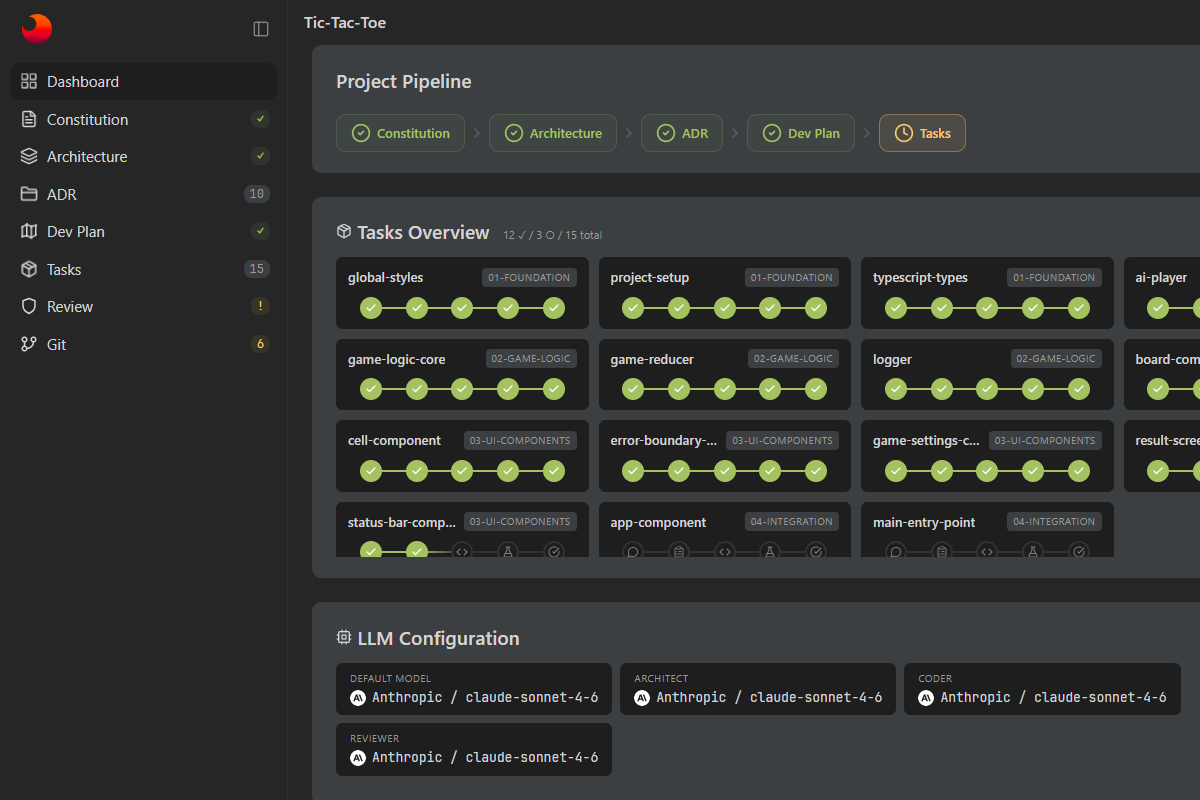
Skaro keeps milestones, tasks, phases, and progress in .skaro next to the code. For each task, you can see its status, current phase, and related artifacts.
Architectural decisions are recorded as ADRs with separate statuses. This helps keep key decisions out of scattered chats and oral discussions.
You can run verify commands and implementation checks for tasks. Results are stored separately so execution, validation, and manual confirmation stay distinct.
After tasks are completed, you can run a project-level review: check required artifacts, task status, and global verify commands, then start a fix cycle for detected issues.
The dashboard includes status, diff, stage, unstage, commit, push, and branch switching. Changes produced in AI cycles can be prepared for commit right away.
Two commands to get started
skaro init creates the .skaro/ structure in your project, then skaro ui starts the local web dashboard.
Artifacts and working phases
Skaro adds a layer of artifacts and managed phases on top of the repository: from project rules and architecture to tasks, tests, and final review.
Git integration
View changes, inspect diffs, stage files, commit, push, and work with branches directly in the dashboard.
Status and token usage
Track project status, task progress, and token usage by phase, task, model, and role.
AI chats and fix cycles
Contextual AI chats are available for architecture, the project, tasks, and feature planning. Separate fix modes are available for tasks and the full project.
Skills and execution environment
You can connect stack-specific skills and choose where verify commands run: on the host, in a Docker Compose service, or through a command prefix.
Different models for different roles
Skaro lets you assign separate models to architect, coder, and reviewer roles to split architectural, implementation, and validation work.
Architect
Used for architecture, devplan, feature planning, and project import analysis.
Coder
Used for task implementation and fix cycles when you need fast, practical work in code.
Reviewer
Used for clarify, checks, and other phases where questions, validation, and quality control matter most.
Constitution presets for common stacks
Skaro includes ready-made constitution templates for common frontend, backend, and mobile stacks. You can use them as a starting point and adapt them to your project.